On this page
Customer support has an awkward shape. A large share of the questions are the same twenty, asked over and over, at every hour. A small share are genuinely difficult, emotionally charged, or worth a lot of money. Staffing for the second group means paying people to answer the first, and staffing for the first means the second group waits.
An AI chatbot for customer service is a way to split that queue. It takes the repetitive volume — where is my order, what is your refund policy, can I move my appointment, why won't this thing turn on — and hands everything else to a person with the conversation already attached.
This guide covers what a support chatbot can realistically handle on its own, what needs a live connection to your other systems, what should never be automated, and how to tell whether any of it is actually working.
The positioning that matters
AI should not replace your customer service team. The model that works is a division of labour: AI handles repetitive, high-volume, structured requests; people handle the complex, sensitive, high-value and unusual ones. Every recommendation below follows from that.
Three kinds of support request, three different answers
The single most useful thing you can do before choosing any tool is sort your incoming questions into three buckets. They demand completely different amounts of work to support, and confusing them is why chatbot projects overrun.
Bucket one is the cheapest to build and usually the largest by volume. Bucket two delivers the most obvious value but costs real integration work. Bucket three is not a failure of the bot — it is the point of having one, because the time the bot saves in buckets one and two is what makes room for it.
The support workflow, end to end
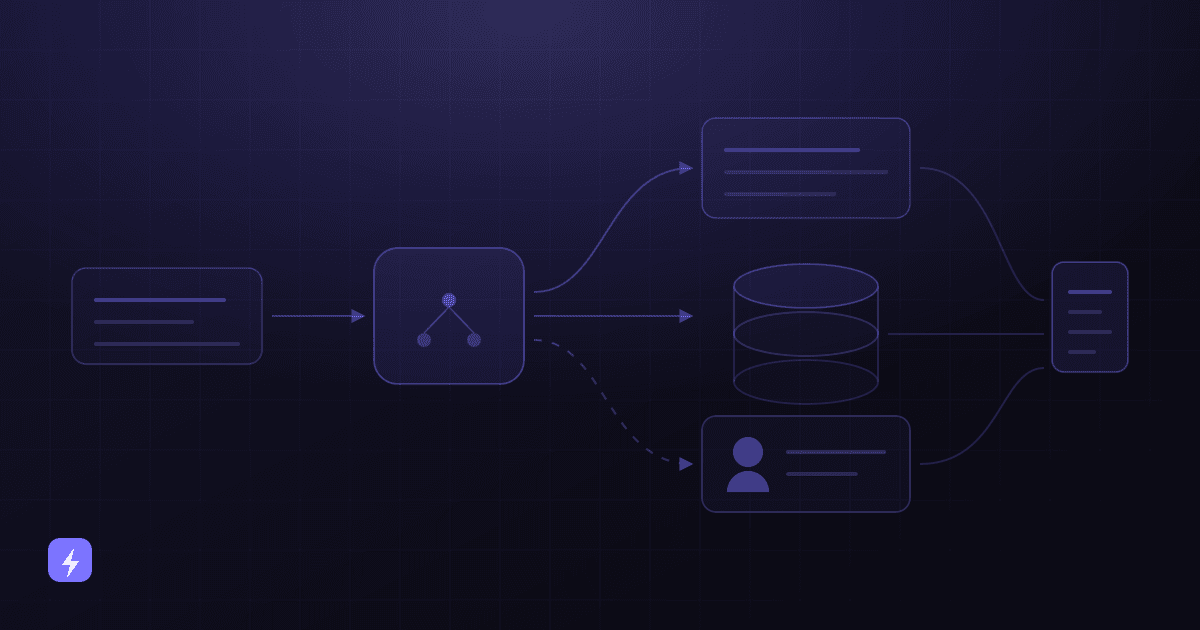
Every well-built support chatbot follows roughly the same path. Understanding it makes the rest of this guide concrete.
The customer asks
In their own words, on your website, at 11pm on a Sunday if that is when they thought of it.
The chatbot works out what kind of request it is
A knowledge question, an action that needs a live system, or something that should go to a person.
It answers or acts
Retrieves the answer from your content, or calls your order system, calendar or CRM and comes back with the real, current status.
It writes the outcome into your systems
A ticket in your help desk, a lead in your CRM, an updated booking, or a logged conversation. This is the step most implementations skip and later regret.
It escalates when it should
Handing over the full transcript, the customer's details and what has already been tried, so nobody has to start again.
You review what happened
Wrong answers get fixed at the source, repeated gaps become new content, and repeated escalations get a decision.
Step four is not optional
A chatbot that answers well but writes nothing into your help desk or CRM gives you a better front door and no record. You lose the ability to see what customers are asking, to follow up, and to improve. If the tool cannot create a ticket or a contact record, it is a widget, not a support system.
What a chatbot can handle from your knowledge alone
These need no integration at all. If your answers are written down clearly, a chatbot can field them from day one — and this bucket is usually where most of the volume sits.
- Frequently asked questions — hours, locations, parking, payment methods, lead times, what is included in a service.
- Product questions — sizing, compatibility, materials, specifications, what is in the box, differences between two options.
- Service questions — what a treatment or job involves, how long it takes, what to prepare, what happens afterwards.
- Returns and refunds policy — the window, the condition requirements, who pays return postage, how long a refund takes.
- Basic troubleshooting — the first three things to try before booking a callout, in the order your team would try them.
- Booking and account how-tos — how to reschedule, how to reset a password, how to update payment details.
The quality here is entirely a function of your written content, not the model. That is a separate job in its own right — how to train an AI chatbot on your business covers the knowledge audit, the writing rules and the review loop that make this bucket work.
What needs a real-time integration
The second bucket is where a support chatbot stops being a smarter FAQ page. These answers change by the hour and live inside other software, so the bot has to be allowed to look them up — and, in some cases, to act.
- Order status — the single most common support question in e-commerce, and the one most obviously suited to automation. It requires a connection to your order or fulfilment system.
- Appointment changes — checking real availability and moving a booking, rather than promising that somebody will call back.
- Returns and refunds as an action — starting a return, generating a label, checking where a refund has got to. The policy is knowledge; the case is an integration.
- Support ticket creation — opening a ticket in your help desk with the transcript attached, so the conversation becomes trackable work.
- Collecting customer information — name, contact details, order reference, account number, captured once and passed on rather than asked twice.
- Lead routing — recognising that a support conversation is actually a sales enquiry and sending it to the right person or pipeline. AI chatbots and lead generation goes deeper on qualification.
Each connection is real work: permissions, field mapping, testing, and a decision about what happens when the other system is unavailable. That is what AI integration and workflow automation actually consist of, and it should be scoped deliberately rather than assumed to arrive with the chat widget.
Read-only first
Start with lookups — order status, availability, ticket status — before letting the bot write to your systems. Reading a wrong record is a bad answer. Writing a wrong record is a support problem of its own. Prove the lookups are reliable, then add the actions.
What should go straight to a person
Some conversations should never be automated, and deciding which ones in advance is part of the build rather than something to discover from an angry review.
- Complaints and disputes. Someone who is already unhappy does not want an efficient answer, they want to be heard.
- Cancellations with a reason attached. That is a retention conversation, and it is worth a person's time.
- High-value accounts. If one customer represents a meaningful share of revenue, they get a human by default.
- Anything unusual. Retrieval finds the closest match to a question, which is not the same as recognising that this case is different from all the others.
- Regulated or sensitive matters. Medical, legal, financial and safety questions need a qualified person, and your rules should say so explicitly.
- Repeated failure. If the bot has missed twice, the third attempt is not the one that works. Hand over.
Escalation is not a weakness in the design — it is what makes customers willing to use the bot in the first place. In Salesforce's seventh-edition research (15,015 consumers, fielded July–August 2024), 45% said they would be more likely to use AI agents where there is a clear path to a person. And in its State of the AI Connected Customer research (16,585 consumers and business buyers), 72% said it is important to know whether they are talking to an AI agent, so say so up front rather than hoping nobody notices.
How the handover is done matters as much as when. Zendesk's CX Trends 2026 research — 11,000+ respondents across 22 countries, fielded June 2025 — found 74% of consumers are frustrated when they have to repeat information, and 81% want to continue a conversation without backtracking. An escalation that arrives as "customer needs help" with no transcript replaces a queue with a queue plus an interrogation. The comparison in AI chatbot vs live chat works through this trade-off in more detail.
AI versus human agents: an honest split
Neither side wins outright. The table below is the practical division most support teams land on once the novelty wears off.
After-hours: the clearest case for automation
The strongest argument for a support chatbot is not that it is cheaper than a person. It is that it is available when no person is.
Zendesk's CX Trends 2026 research found 74% of consumers expect service to be available 24/7 — an expectation very few small businesses can staff. The realistic version of round-the-clock support for most companies is not a night shift; it is a bot that resolves the routine questions overnight and queues everything else with enough context that the morning team can pick it up cold. If the out-of-hours pressure is on the phone rather than the website, an AI voice agent is the closer fit.
Set expectations honestly out of hours
"Our team is back at 9am — I can answer questions now and pass anything else straight to them" is a better overnight experience than a bot that pretends a person is one message away. Zendesk's research also found 95% of consumers expect explanations for AI-made decisions; being upfront about what happens next is the cheapest version of that.
Multilingual support, and its honest caveat
Serving customers in more than one language used to mean hiring for it. Modern support agents handle a wide range: Intercom's documentation for its Fin agent lists support for 67+ languages, with the customer's language detected automatically from their first message.
The caveat is the part vendors mention less often, and Intercom is refreshingly direct about it. Fin translates its answer into the customer's language, but "the original source content that Fin references or pulls from will remain in its original language," and Intercom's guidance is to add content in the languages you want to support rather than relying on translation. Language detection also happens once per conversation, so a customer who switches mid-thread does not get a switched reply.
The practical reading: multilingual support is real and it is cheap compared to hiring, but a translated answer built on English-only source content is weaker than a native-language answer built on native-language content. If a second language is a serious part of your market, budget for writing your key answers in it.
Five businesses, five different support jobs
The right first automation is not the same everywhere. What follows is a realistic starting point for each, not a claim about results.
E-commerce
Order status dominates the queue, and it is almost entirely an integration problem rather than a writing one. Start with a connection to the fulfilment system, add returns policy answers and sizing or compatibility questions from your product content, and route anything about a damaged or missing item to a person.
Dental and other appointment-based practices
The volume is booking, rescheduling and cancellation, plus pre-appointment questions about preparation and cost. A calendar integration handles most of it. Anything clinical goes to a person without exception, and the rules document should name that boundary explicitly.
Home services
Two jobs sit side by side: qualifying new enquiries (what is the job, where, when, is it in the service area) and answering existing customers about appointment windows. Basic troubleshooting can genuinely reduce unnecessary callouts — the three things a technician would ask on the phone anyway — but anything involving gas, electricity or water safety goes straight to a human.
Restaurants and hospitality
Hours, menus, allergens, parking, group bookings and cancellation terms are almost all knowledge questions, which makes this the fastest bucket to launch. Allergen answers deserve particular care: state them from your own written source and escalate anything ambiguous rather than inferring.
Professional services
Volume is lower and value per conversation is higher, which inverts the usual priority. Here the bot's main job is qualification and routing — understanding what the enquiry is about and getting it to the right person quickly — rather than resolving it. Advice itself stays with the qualified professional.
What to measure
Most support chatbot reporting defaults to conversation volume, which tells you almost nothing. These are the numbers that actually indicate whether the thing is working. Record them for a few weeks before launch, or you will have nothing to compare against.
- First response time, split by in-hours and out-of-hours. Out-of-hours is where the change should be most visible.
- Routine questions resolved without a person — count them by type, not just in total, so you can see which content is earning its keep.
- Escalation rate, and more usefully the reasons. A rising escalation rate for one topic is a content gap wearing a disguise.
- Support ticket volume, separated into tickets the bot created and tickets that came in another way.
- Customer wait time before reaching a person — the metric a customer actually feels.
- Appointment completion — bookings made or changed through the bot that were kept, for appointment-driven businesses.
- Lead routing accuracy — how many enquiries reached the right owner without a human re-routing them.
- Support team workload — what your team is spending its time on now, and whether the mix has shifted toward the harder work.
Two qualitative checks belong alongside those. Read a sample of transcripts weekly, and track wrong answers separately from unanswered ones: an unanswered question costs you a handover, while a confident wrong answer about a refund costs you a customer.
Be suspicious of "resolution rate"
Vendors define resolution differently, and most definitions count a conversation that simply ended. Before you accept a resolution figure — from a vendor or from your own dashboard — find out what it counts as resolved. A customer who gave up looks identical to a customer who got an answer.
Where support chatbots go wrong
- Hiding the exit. No visible route to a person turns a helpful tool into a trap, and the trap is what gets written about.
- Escalating without context. Handing over a bare notification undoes the entire benefit, and Zendesk's research shows repeating information is one of the things customers resent most.
- Automating the complaint queue. The conversations that most need a person are often the ones a busy team most wants to hand off. Resist it.
- Launching on stale content. An out-of-date policy answered instantly is worse than a slow, correct one.
- Connecting write actions too early. Let the bot read from your systems before it changes anything in them.
- Treating launch as done. Support content decays constantly — new products, changed policies, seasonal hours. Without a review loop, accuracy falls quietly.
- Measuring deflection alone. A high deflection rate with rising complaints is not a success, it is a queue you have hidden from yourself.
Limitations worth planning for
- It cannot answer what nobody wrote down, and it cannot look up what it is not connected to.
- It can misread context and answer confidently. Grounding it in your own content reduces invented answers substantially; no setup removes the risk entirely.
- It handles one language per conversation, and answers are only as good as the content behind them in that language.
- It cannot make an exception. Discretion — waiving a fee, bending a policy for a good customer — is a human decision by design.
- It will not fix a broken process. If people ask where their order is because fulfilment is unreliable, a faster answer is not the improvement they need.
- It needs someone to own it. A support chatbot with no weekly reader degrades within months.
Where to start
- Export the last few hundred support conversations and count the questions by type.
- Sort the top twenty into the three buckets: knowledge, integration, or human.
- Write or correct the answers for the knowledge bucket. This is the bulk of the work and it benefits your team regardless.
- Pick one integration — usually order status or appointment booking — and do that one properly.
- Write the escalation rules, including what the bot must never attempt and what it collects before handing over.
- Record your current response times and ticket volumes, so launch has a baseline.
- Launch on the knowledge bucket plus that one integration, then read the transcripts weekly and expand from what you find.
Narrow and reliable beats broad and unpredictable. A bot that handles fifteen question types correctly earns the trust to be given more; one that attempts everything on day one usually gets switched off. Costs vary widely by scope and integration count — what AI chatbots cost breaks down where the money goes, and the AI glossary defines the terms vendors will use in the conversation.
What can an AI chatbot do for customer service?
It can answer questions that exist in your written content — hours, policies, product and service details, basic troubleshooting — and, when connected to your systems, look up order status, check appointment availability, change bookings, create support tickets and capture customer details. It should also recognise the conversations that need a person and hand them over with the full transcript attached.
Will an AI chatbot replace my customer service team?
It should not, and the businesses treating it that way tend to regret it. The workable model is a division of labour: the chatbot absorbs repetitive, high-volume, structured requests, and your team spends its time on complaints, complex problems, retention conversations and high-value customers — the work where a person genuinely changes the outcome.
Can a chatbot check order status or change an appointment?
Only if it is connected to the system holding that information. Order status needs a link to your order or fulfilment platform; appointment changes need your calendar or booking system. These are the highest-value automations in most support queues, and they are integration work rather than content work.
How does escalation to a human agent work?
You define the triggers in advance — an explicit request for a person, a complaint, a cancellation, a repeated failed answer, anything regulated — and the bot hands over the conversation, the customer's details and what has already been tried. Salesforce's research found 45% of consumers would be more likely to use AI agents where there is a clear path to a person, so a visible exit helps adoption rather than undermining it.
Does an AI chatbot work outside business hours?
That is usually its strongest use. Zendesk's CX Trends 2026 research found 74% of consumers expect 24/7 availability, which very few small businesses can staff. Overnight, a chatbot can resolve routine questions immediately and queue everything else with enough context for the morning team, instead of leaving a contact form and a wait.
Can a support chatbot handle multiple languages?
Modern agents handle a wide range — Intercom's documentation lists 67+ languages for its Fin agent, with the customer's language detected automatically. The caveat is that answers are translated while the source content stays in its original language, and Intercom recommends adding native-language content rather than relying on translation. If a second language matters commercially, write your key answers in it.
Should the chatbot create support tickets in our help desk?
Yes, wherever the tool allows it. A chatbot that answers well but writes nothing into your help desk or CRM leaves you with no record of what customers asked, no follow-up path and no way to improve. Ticket creation with the transcript attached is what turns a conversation into trackable work.
How do we know whether it is working?
Track first response time in and out of hours, routine questions resolved without a person, escalation rate and the reasons behind it, ticket volume, customer wait time before reaching a person, and how your team's workload has shifted. Record all of it for a few weeks before launch so the comparison means something, and treat wrong answers as a separate, more serious category than unanswered ones.
The takeaway
An AI chatbot for customer service is not a replacement for your support team and it is not an experiment worth running for its own sake. It is a way to sort your queue: repetitive questions answered instantly at any hour, live lookups handled without a person, and everything difficult routed to someone who can actually help — with the context already attached.
The work that makes it succeed is unglamorous and mostly yours: sorting the questions, writing the answers, choosing one integration, defining the escalation rules, and reading the transcripts afterwards. Do that and the technology is the easy part.
Sources
Every third-party figure above was read from the publishing organisation's own page in August 2026. Research and product documentation change; check the source before relying on a number.
- Zendesk CX Trends 2026 — 11,000+ respondents (6,182 consumers, 5,115 business respondents) across 22 countries, fielded June 2025: 74% expect 24/7 availability, 74% frustrated by repeating information, 81% want conversations continued without backtracking, 95% expect explanations for AI-made decisions.
- Salesforce — State of the AI Connected Customer — 16,585 consumers and business buyers: 72% say it is important to know whether they are communicating with an AI agent.
- Salesforce newsroom — AI Connected Customer research, seventh edition — 15,015 consumers, fielded July–August 2024: 45% would be more likely to use AI agents where there is a clear escalation path to a human.
- Intercom — Set up Fin AI Agent's multilingual support — 67+ languages, automatic detection once per conversation, answers translated while source content remains in its original language.
No performance statistics, ROI figures, cost savings or customer results appear above. Every outcome in this article is described as something to measure, not something to expect.